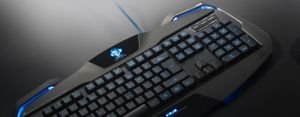


The ASUS ROG Strix Scope II Full-Size Gaming Keyboard is engineered for gamers and professionals who demand superior performance, precision, and customization. Crafted by ASUS, a leading name in gaming hardware, this keyboard (model 90MP036A-BKUA01) delivers exceptional quality and innovative
features, making it a standout choice for gaming setups, offices, or home environments.
At the heart of the ROG Strix Scope II are the NX Snow Linear switches, designed for ultra-smooth actuation and rapid responsiveness. These switches ensure every keystroke is registered instantly, providing a soft and quiet typing experience ideal for competitive gaming, fast-paced action, and long typing sessions. With advanced Anti-Ghosting and N Key Rollover technology, you can press multiple keys simultaneously without losing any input, giving you an edge in high-stakes games and enhancing productivity.
Connectivity is streamlined through a reliable USB 2.0 (Type C to Type A) interface, paired with a robust 2-meter cable for flexible desk placement and minimal signal loss. Each
features vibrant per-key RGB lighting, fully customizable via AURA Sync, allowing you to match your keyboard’s illumination to your mood, game, or workspace aesthetic.
Compatibility is seamless with Windows® 11, and the Armoury Crate software enables easy personalization of lighting effects, macro programming for all keys, and fine-tuning of overall performance. The keyboard is built to last with a sturdy black chassis, measuring 436 x 129 x 37 mm and weighing 839g (excluding cable), ensuring stability during intense gaming or extended work periods.
features include
- NX Snow Linear switches for smooth, fast, and quiet input
- Customizable per-key RGB lighting with AURA Sync support
- Full Anti-Ghosting and N Key Rollover for flawless multi-key input
- All keys programmable as macros for personalized control
- Durable design, suitable for gaming rooms, offices, and home use
- Care instructions: To maintain optimal performance and appearance, clean the keyboard regularly with a dry or slightly damp cloth, and avoid spilling liquids on the surface. Disconnect the cable before cleaning and refrain from using harsh chemicals.